

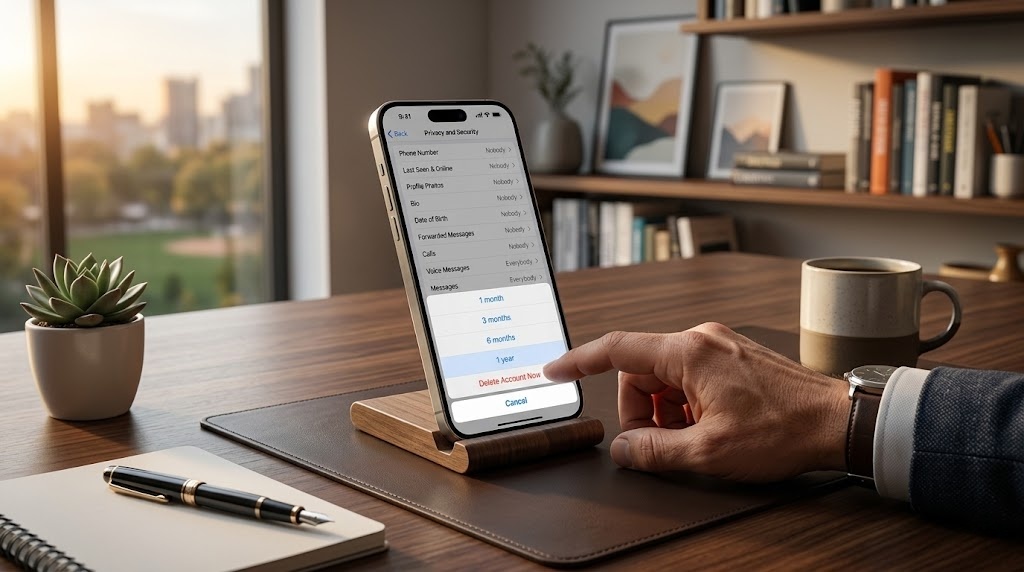
Telegram has become one of the most popular messaging platforms in the world. Millions of people rely on it daily for communication, file sharing, communities, and even business interactions. Yet despite its popularity, many users eventually decide they no longer need the service. Whether it’s for privacy reasons, digital detox, switching platforms, or simply reducing app clutter, learning how to delete Telegram account safely and correctly is important.
Unlike many apps that allow instant deletion from inside the mobile interface, Telegram uses a specific web-based process. This system is designed to ensure security and prevent accidental account removal. However, it also means many users struggle to find the correct steps.
This comprehensive guide explains everything you need to know. You will learn the exact deletion process, what happens to your data, how Telegram handles privacy, the difference between deleting and uninstalling, common mistakes, security implications, and expert tips for managing your digital footprint.
By the end of this guide, you will clearly understand how to delete Telegram account, what to expect afterward, and how to protect your information before leaving the platform.
Understanding Telegram Accounts and Data Structure
Telegram accounts are tied directly to a phone number rather than a traditional username and password system. This means your identity on the platform is primarily verified through SMS authentication, making access simple but also linking your account to a real-world identifier.
When people search for how to delete Telegram account, they are often surprised that deleting the app or logging out does not remove their profile. Telegram stores conversations, contacts, and media within its cloud infrastructure. As a result, uninstalling the application leaves your account fully active and accessible if you log in again.
Because Telegram is cloud-based, the account itself functions more like an online identity rather than a local device installation. This structure is why a proper deletion procedure is required to permanently remove it.
Why People Decide to Delete Their Telegram Accounts
Users leave messaging platforms for a variety of personal and professional reasons. Privacy concerns are among the most common motivations, especially for individuals who want to minimize the amount of personal data stored online.
Another common reason relates to digital wellbeing. Many people feel overwhelmed by constant notifications, large group chats, and online communities. Learning how to delete Telegram account becomes part of a broader effort to reduce screen time and reclaim focus.
There are also practical reasons such as switching to alternative messaging services, maintaining fewer accounts, or separating personal and business communication channels.
Important Things to Know Before Deleting Your Account
Before proceeding with deletion, it is essential to understand that removing your Telegram account is permanent. All conversations, media files, contacts, groups, and channels associated with your profile will be erased.
Anyone researching how to delete Telegram account should first back up important information. Once the account is removed, Telegram does not provide a recovery system for lost messages or files.
Additionally, deleting your account may affect communities or groups you manage. If you are an admin of a channel or group, ownership may transfer automatically to another admin.
The Official Telegram Deletion Method
Telegram intentionally separates the account deletion process from the mobile application. Instead of placing the option inside the app interface, the company requires users to complete the removal through a secure webpage.
When someone searches for how to delete Telegram account, they are typically directed to Telegram’s official account management portal. This portal verifies your identity using a login code sent to your Telegram app rather than SMS, adding an extra layer of protection.
This system ensures that even if someone temporarily gains access to your phone number, they still cannot delete your account without access to the Telegram app itself.
Step-by-Step Process to Permanently Remove a Telegram Account
The deletion procedure itself is straightforward once you understand where to start. First, open Telegram’s official account deletion page using any browser on your phone, tablet, or computer.
Next, enter the phone number associated with your account using the international format. After requesting access, Telegram sends a confirmation code directly to your Telegram messages. Enter that code on the website and confirm the request to complete how to delete Telegram account permanently.
Once confirmed, the platform immediately erases your profile and disconnects your phone number from Telegram’s system.
Deleting Telegram from Mobile Devices
Many users assume deleting the app automatically removes their profile. Unfortunately, uninstalling Telegram only removes the application from your device while leaving your account active in the cloud.
If you want to fully understand how to delete Telegram account, you must use the official deletion page rather than relying on app removal. Otherwise, your contacts may still see your profile and message you.
Deleting the app can be a useful first step if you want a break from notifications, but it does not eliminate the underlying account.
What Happens After Your Telegram Account Is Deleted
Once the deletion process is confirmed, Telegram permanently removes your account from its system. All messages, contacts, and media associated with your profile disappear immediately.
Users who research how to delete Telegram account should understand that they cannot restore their old chat history after deletion. The process is designed to protect privacy by ensuring data cannot be recovered later.
If you decide to join Telegram again, you must create a completely new account with no previous history.
How Telegram Handles Data and Privacy
Telegram has long promoted itself as a privacy-focused messaging service. The platform uses encryption technologies and allows features like secret chats that include self-destructing messages.
However, people who learn how to delete Telegram account often do so because they want maximum control over their personal data. Removing the account ensures your identity and communication records are no longer stored on Telegram’s servers.
This action can provide peace of mind for users who prefer minimizing their digital footprint.
Temporary Alternatives to Deleting Your Account
Some people consider account deletion when they simply need a break from messaging apps. In such cases, temporary options might be more appropriate.
Instead of immediately learning how to delete Telegram account, users can mute notifications, archive chats, or log out of the app. These methods reduce distractions without permanently erasing your data.
Taking a temporary break can help you decide whether full deletion is truly necessary.
Automatic Self-Destruct Settings in Telegram
Telegram includes an automatic account deletion feature designed to protect inactive users. If an account remains unused for a specified period, Telegram automatically removes it.
For individuals researching how to delete Telegram account, this feature may offer an alternative. By adjusting inactivity settings, the platform can erase your account automatically after months of inactivity.
This method is slower but requires no manual action once configured.
Security Considerations When Deleting Messaging Accounts
Deleting an account might seem simple, but it carries security implications that users should understand. Removing Telegram disconnects your identity from conversations and group histories.
Those studying how to delete Telegram account should ensure that sensitive conversations are already saved or deleted appropriately before proceeding. Once removed, messages cannot be recovered.
Security experts often recommend reviewing active sessions and devices before deleting an account to ensure no unauthorized access remains.
Differences Between Deactivation and Deletion
Some social media platforms allow temporary deactivation that hides your profile while preserving your data. Telegram, however, focuses primarily on permanent removal rather than temporary suspension.
When people search how to delete Telegram account, they are effectively choosing irreversible deletion rather than a pause. The platform removes your identity completely rather than hiding it temporarily.
Understanding this distinction helps users make a more informed decision before continuing.
Telegram Account Deletion Timeline
The actual deletion process takes only a few seconds once you confirm the request. However, Telegram limits how frequently you can delete and recreate accounts.
Users who repeatedly search how to delete Telegram account and create new accounts may encounter temporary restrictions. These limits exist to prevent spam or abuse of the system.
Therefore, it is wise to ensure you truly want to delete the account before confirming the final step.
Common Problems During the Deletion Process
Many users experience confusion when they try to remove their account for the first time. The most common issue involves entering the phone number incorrectly without the international country code.
Another common obstacle appears when users attempt how to delete Telegram account but wait for an SMS code instead of checking their Telegram messages. Telegram usually sends the login code directly inside the app.
Understanding these small details prevents unnecessary frustration during the process.
Expert Insights on Digital Account Management
Digital identity management has become an essential skill in the modern online environment. Messaging platforms, social networks, and online services constantly accumulate personal data.
Cybersecurity researcher Bruce Schneier once said, “Privacy is an inherent human right, and losing control over personal data means losing control over part of our lives.”
For individuals researching how to delete Telegram account, this perspective highlights why understanding account removal and data ownership is increasingly important.
Telegram Account Deletion Comparison Table
The table below highlights important differences between common account management actions on Telegram.
| Action | What Happens | Data Stored | Reversible |
| Uninstall App | Removes app from device | All data remains on Telegram servers | Yes |
| Log Out | Disconnects device session | Account and chats remain intact | Yes |
| Inactivity Auto Delete | Account removed after inactivity period | Data deleted after trigger | No |
| Manual Account Deletion | Account permanently erased | All chats, contacts, and media deleted | No |
Understanding these distinctions helps clarify why people specifically search how to delete Telegram account when they want permanent removal.
Preparing Your Data Before Deleting Telegram
Before finalizing deletion, it is wise to review important conversations, shared files, and media stored in your chats. Telegram often becomes a storage hub for documents and images exchanged over time.
Anyone researching how to delete Telegram account should export or save important files beforehand. Once the deletion occurs, all information disappears permanently.
Backing up critical data ensures that valuable information is not lost during the transition.
How Account Deletion Affects Groups and Channels
Telegram groups and channels often rely on administrators to maintain structure and moderation. If an admin deletes their account, ownership typically transfers to another administrator.
For community leaders learning how to delete Telegram account, it is important to appoint trusted admins beforehand. Otherwise, the group may lose essential management functions.
Planning this transition ensures that communities continue operating smoothly after your departure.
Misconceptions About Telegram Account Removal
One common misconception is that deleting Telegram removes your messages from other users’ devices. In reality, messages that already exist in other people’s chats may still remain visible.
People searching how to delete Telegram account sometimes expect total conversation disappearance across all devices. While your account disappears, previously delivered messages may remain in recipient chat histories.
Understanding this limitation helps users set realistic expectations about data removal.
Digital Minimalism and Messaging Platforms
Digital minimalism has gained popularity as people try to regain control of their online habits. Reducing the number of apps and services can simplify daily life and improve productivity.
For many users, learning how to delete Telegram account represents a step toward reducing digital noise. Removing unnecessary platforms allows individuals to focus on tools that genuinely add value.
This philosophy encourages intentional technology use rather than constant connectivity.
Conclusion
Telegram remains a powerful communication platform used by millions worldwide. Its cloud-based infrastructure offers convenience, fast messaging, and large communities. However, not every user wants to maintain a permanent presence on every digital platform.
Understanding how to delete Telegram account gives you full control over your online identity. Whether you are concerned about privacy, reducing screen time, or simplifying your digital life, permanently removing your Telegram account is a straightforward process when done correctly.
Before deleting, remember to back up important files, inform relevant contacts, and review any groups or channels you manage. Once the account is deleted, the action cannot be reversed.
Ultimately, managing your digital accounts responsibly ensures that technology remains a helpful tool rather than an overwhelming obligation.
FAQ
How long does it take to delete a Telegram account?
The process of how to delete Telegram account takes only a few minutes once you confirm the request through Telegram’s official deletion page.
Can I recover my Telegram account after deletion?
No. When you complete how to delete Telegram account, the platform permanently removes all data and chat history.
Does uninstalling the app delete my Telegram account?
No. Uninstalling Telegram does not complete how to delete Telegram account because the account remains active in Telegram’s cloud system.
Can I create a new account with the same number later?
Yes, but after performing how to delete Telegram account, you must register again as a completely new user with no previous data.
Will my contacts know when I delete my account?
When you finish how to delete Telegram account, your profile disappears from contact lists and may appear as a deleted user in previous chats.
You May Also Read Aplus Blog

